- Click on the Start button. Go to Accessories. Right click on the "Command Prompt" and choose "Run as Administrator" from the context menu.
- Type regsvr32 jscript.dll in the black window and press enter
- Try to run setup again. It should proceed smoothly now :)
Thursday, October 2, 2008
Internal Error 2739 while installing Adobe CS3 on Vista
If the setup program prompts you with "Internal Error 2739" then, you might want to consider this solution.

Monday, September 29, 2008
Build HTK 3.4 from Source with Visual Studio 2008
I don't know why the HTK website itself did not provide a download for Windows binary release so we don't have to rebuild it again. However, I found that the binary for HTK 3.3 is available for download at their software archive page here (you need to be a registered user first, free of charge.)
I followed the notes posted by Ivan Uemlianin. The notes suggest me to convert the HTK source files which is in Mac format to Windows format. These source files have additional characters (CR CR CR LF) instead of Windows' (CR LF.) So you need to correct them before using Visual Studio's nmake.
Convert Mac's files to Windows'
Ivan Uemlianin himself uses a Python script to convert the files. The method I used here is not involved with programming. But you need a open-source software Notepad++ instead. Download Notepad++ here.
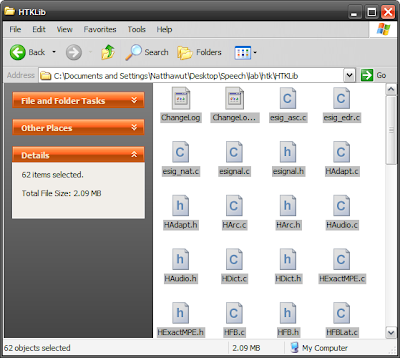
First, I drag all the files those need to be compile into Notepad++. Then, I turn on the "Show all characters in View -> Show all characters.
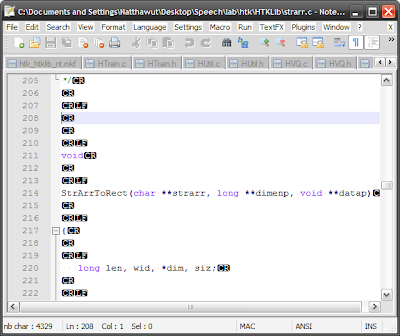
Next, the most important part, replace all the (CR CR CR LF) with (CR LF.) Fill in the "Find what :" with "\r\r\r\n" and "Replace with" with "\r\n" as shown in the picture below. Notice that the "Extended (..." checkbox at the bottom of dialog is checked. When you are ready, click "Replace all in all opened documents."
It will take a while on an old computer. Mine takes around 40 seconds :(

After the process finished, press the "Save All" button. Now you are ready to nmake the source files! You can follow the readme provided with HTK from now on :)
I followed the notes posted by Ivan Uemlianin. The notes suggest me to convert the HTK source files which is in Mac format to Windows format. These source files have additional characters (CR CR CR LF) instead of Windows' (CR LF.) So you need to correct them before using Visual Studio's nmake.
Convert Mac's files to Windows'
Ivan Uemlianin himself uses a Python script to convert the files. The method I used here is not involved with programming. But you need a open-source software Notepad++ instead. Download Notepad++ here.
First, I drag all the files those need to be compile into Notepad++. Then, I turn on the "Show all characters in View -> Show all characters.


Next, the most important part, replace all the (CR CR CR LF) with (CR LF.) Fill in the "Find what :" with "\r\r\r\n" and "Replace with" with "\r\n" as shown in the picture below. Notice that the "Extended (..." checkbox at the bottom of dialog is checked. When you are ready, click "Replace all in all opened documents."
It will take a while on an old computer. Mine takes around 40 seconds :(

After the process finished, press the "Save All" button. Now you are ready to nmake the source files! You can follow the readme provided with HTK from now on :)
Sunday, September 28, 2008
Google DevFest Bangkok
The registration is open now and those who are in Thailand on October 31st might want to join the event :)
Thanks to my friend, Aruj, who informed me about this.
Register for DevFest Bangkok here
Thanks to my friend, Aruj, who informed me about this.
Register for DevFest Bangkok here
What: Google will be holding a DevFest in Bangkok. Join us for a day of coding and fun, where we'll cover topics ranging from OpenSocial & App Engine to YouTube & the Google Maps API.
Who: You! We'll provide space, power, and refreshments. You just need to bring your own laptop, ideas and enthusiasm to complete the mix.
When: Friday October 31st, 2008 1:00PM-10PM
Where: Chulalongkorn University
Subscribe to:
Comments (Atom)